
As I’m a mainlander Chinese, I can only speak for those computers and browsers who live in central P.R.China.
If you are making a design for or in Mandarin Chinese, especially Simplified Chinese, beside those common English web safe fonts such as Arial and Verdana shipped in MS Windows by default that 95% mainlander Chinese rely on, you can specify font-family in CSS by the following typefaces for Chinese characters, they are almost totally safe across all Chinese browsers:
- 宋体, mostly used for large chunks of paragraphs in small font sizes.
- 黑体, works out well in either headings or paragraphs.
- 幼圆, slender touches and rounded corners, pearl’s way.
- 隶书, renaissance of a rather traditional Chinese brush writing dating thousands of years back, generally modest and conservative with an ancient style yet powerful from within.
- 微软雅黑, the new Chinese character font introduced in Vista and with IE7, though not that safe compared with the former 4 in that it’s not automatically included in the Chinese localized version of Windows XP, it’s generally accepted as the most elegant and beautiful of the Mandarin Chinese web safe fonts by Chinese web designers.
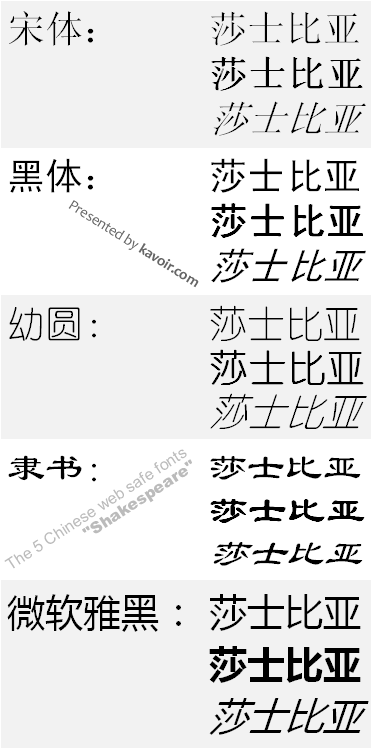
I have also made a screenshot of how these fonts look in real Chinese characters in FF2, with normal, bold and italic states for each typeface. The 4 characters is Shakespeare in Chinese in the right column with the name of the font in the left column.
What are the name of these fonts?
thanks
@DNS – If you intend to use one of them for Chinese texts, you’ll have to specify them in CSS in Chinese, because the font names are in Chinese.
In the picture I put up, texts in the left column are the name of that font used for the particular Shakespeare on the right.
Thanks for posting this Yang Yang – it is just what I am looking for! I am also looking for example of nice typography using hanyu – do you have any sites that you would recommend ?
@Dave Rutter – Glad helped out. 🙂
Well, let me give you a few renowned web design agencies and communities in mainland China if you don’t know any of them yet:
1. http://www.chen-design.com – A Beijing based big design studio who has designed fairly a few national government websites. Their portfolio: http://www.chen-design.com/client.htm
2. http://www.reeyee.cn – A Nanjing based web design company focusing primarily on SMB and enterprise internet marketing services. Their portfolio: http://www.reeyee.cn/case.php
3. http://www.blueidea.com – Currently the largest community for Web design in mainland China. It has a forum at here: http://bbs.blueidea.com
Might get what you need in their portfolio section.
Unlike English websites who have a relatively wide array of available typographical options, due to a lack of good common typefaces, Chinese web designers are doomed with a very limited number of fonts in which, 宋体 is undoubtedly used for more than 95% of the texts on any Chinese website. Even the design agencies you see above use 宋体 for almost all of its Chinese characters (search their css file under GBK encoding for ‘宋体’). One thing noteworthy is that no matter what English fonts you have specified with font-family, such as ‘Arial’, the typeface will always fall back on ‘宋体’ by default if there’s any Chinese characters inside the selector.
Images or sIFR is the only ways to diversify Chinese website typography which are rarely used from what I’ve seen so far, except for headings that need to stand out.
Thanks again! It’s a same that the fonts are so limited for such a beautiful language. I prefer not to use images or sIFR as I prefer to use text as it is better for search engines.
I’ll let you know what I come up with when I do start doing the site.
@Dave – Can’t wait to see what you are doing. 😉
Thanks for introducing font-family for Chinese characters. I am facing another problem for web content with Chinese and English characters:
In reason of multilingual, I’m using “Arial” for the web content. It looks good, but it will be better if there is letter-spacing between each Chinese character. But this will effect English characters like email address displaying in the content.
It is irritating if I set a letter-spacing in body style, but add a tag one by one to those English words. I have tried inter-ideograph and inter-word, but it shows no effect in both Firefox and IE browser.
Do you have any solution on this?
@Ching
I tested a mixed string of Chinese characters and English email addresses and the letter-spacing property works fine for me. All the characters including both the Chinese ones and the English ones are evenly spaced from each other. Did you mean to apply letter-spacing to only English characters but not Chinese ones?
Hi all,
Can you tell me where can I download those fonts, I have a English version of Windows XP
Regards.
Pingback: Download Web Safe Simplified Chinese Fonts: Song Ti, Hei Ti, Youyuan, Lishu, MS Ya Hei
@rraallvv,
I have posted a download link where you can download these fonts now:
https://www.kavoir.com/2009/06/download-web-safe-simplified-chinese-fonts-song-ti-hei-ti-youyuan-lishu-ms-ya-hei.html
I had problems copying and pasting the chinese font names, so if anyone else is struggling with that: Use a text editor which is capable of displaying chinese fonts, e.g.: http://www.jext.org/
Yang Yang: Thank you for the web safe fonts. 🙂
If you are using Windows, try installing this Chinese language patch first: http://www.microsoft.com/downloads/details.aspx?familyid=DEB6731A-CA36-47A3-B4A0-2A1D19EEFA05&displaylang=en
It’ll help your system display Chinese characters correctly so you can copy and paste them.
Quote: Well, let me give you a few renowned web design agencies and communities in mainland China if you don’t know any of them yet:
You forgot to add http://www.petralian.com 😉
Would you mind showing a snippet of CSS that would prefer the brushed style fonts, but fall back on the blocky ones if not available? I’d like it to look good on Windows XP/7/Mac/Linux (English) and able to be anti-aliased. I know that is a tall order, sorry about that.
What I’m trying to accomplish is to have a large character symbolizing the main idea of my blog post. It is working ok so far, but I get blocky characters instead of the ones with a brushed style and a bit out of my league here. 😉
My first stab:
ideograph {
font-size: 10em;
font-family: “隶书”, “宋体”, Arial;
}
If it’s just one large Chinese character you need, I’d suggest an image instead of real text. I’ve no idea what you mean by brushed style fonts or blocky, but typeface anti-aliasing differs browser to browser, on some browsers, it’s well anti-aliased while on others, it’s not. It also depends largely on the font-size you use, at some sizes it looks well anti-aliased but at others it doesn’t.
The CSS snippet you posted, is ‘ideograph’ a tag or class? Looks like a class to me so shouldn’t there be a dot before it?
Hi, I’m trying to avoid using images if I can, as the fonts are looking good and save time. I’m using blogger and graphics are a big pain in the butt.
Yes, about the dot, it was a typo.
Brushed vs. Blocky. I’m referring to the style of #4 which you describe as “brush writing.” I’d describe my previous results as “blocky,” with very thick straight lines, similar to the bold version of #5 above.
Thanks for your help.
hi
i’d like to understand well this.
i’m working on a new site and we want to display chinese characters and western ones on the same page.
so, for those spots where chinese characters should go,.. is this a right command for css…?
font-family: 微软雅黑;
font-size: 16px;
font-weight: 900;
text-transform: uppercase;
and… should i add something to the html code on the header about the characters displayed by the website?
thanks a lot for your help
The CSS snippet you posted seems right to me. You are right about the header meta part. Just use UTF-8 for charset and encode the HTML file in UTF-8.
thanks Yang Yang.
one more thing, I’m trying to get the characters to look fat, but bold, or font-weight: 900 is not working, is there something like 微软雅黑 bold? to get them as thick as on the image you are showing us here?
Yep, there are separate bold versions of 微软雅黑 which you (and the users) must download and install on the computer for the ‘bold’ property to work. I checked the Fonts directory of my computer and the bold version I’m currently using is ‘微软雅黑 Bold’.
If it is installed, there’d be no problem setting a bold property to the font in any possible way in CSS.
Thanks again Yang Yang. And I have one more question 🙂
do you know what if it works to set a western style of fonts and a chinese one for one element.
I mean, for example:
.class p{
font-family: 微软雅黑;
font-family: Arial, Helvetica;
font-size: 16px;
font-weight: 900;
text-transform: uppercase;
}
So when chinese characters come it looks with that family, and when western characters come out they do it on Arial.
?
Hmm, tried a few combinations and this seems to be working in FF:
.class p {
font-family: Arial, Helvetica, 微软雅黑;
}
But it’s not working in IE. As far as I know, this doesn’t seem possible.
guess you’re mising the “” around the chinese font name.. i have no trubles at all in IE..
Agree. If you have a mix Chinese and English site, and you specify font family arial, simsun or 微软雅黑, in IE the first font specify will be used to render both the Chinese and English words . So the English words may look ugly in simsun.. Or Chinese words get rendered other than simsun, which causes alignment issues etc.
Whereas for FF, it is ok as both will display accordingly to the right font.
Unless there’s a font both English and Chinese is nice …
thanks for your post! i was searching all night to find a good simplified chinese font-stack.
but maybe there’s one more you can help me with.. i aswell need a stack for traditional chinese and so far stick with “Li Sung” but thats close to unreadable. besides that i have no clue of chinese 🙂
would appreciate if you can give me a hint.
thanks,
tobi.
Very nice article. Thanks for sharing.
We are a Chinese American nonprofit coalition specializing in end of life care for Chinese. our revamped website will include Traditional, Simplified, and English pages. Since our webmaster (me) does not speak Chinese (linguistically deprived), our process is to write the pages in English, have them translated into traditional Chinese and then convert them to Simplified. Our translators work on PCs. I use a mac. Now ….
What traditional Chinese font(s) can our translators use that will (1) maintain formatting and look just as good on a Mac? (2) What mac font should be installed to handle this? (3) What simplified Chinese font(s) are best for the conversion? I hear Simsun ttf is the best. (4) Is the traditional-to-simplified conversion process really a one-click deal? The website theme I’m using is unicode compliant. Did a month in China two years ago. What wonderful memories!
Don’t worry about the font used on the Macs, just copy the text. The rendering of the Chinese characters should be entirely controlled with CSS.
Pingback: Chinese language tips for web design « Orangutangy
Good Article.
I am not chinese but have been tasked with the development of a website with a predominantly chinese audience.
I am currently looking at typography options and I believe that the major issue with embedding chinese fonts using the best latest techniques are hindered due to the font-size:
I am currently looking into how one might create a subset of a font and embed only the fonts used.
Hi Yang Yang !
I am an italian web-designer, living in Italy and dreaming !
I am studying chinese and I love China so much, even if I’ve never visited it yet 🙁
I just created a social network called AMICINA for chinese people as you and foreigner (as me) who love China. Search for it, ok?
I want to keep in touch with you, it seems we’ve a lot in common and .. I am not good at coding ! 🙂
These are not web-safe fonts. These are Windows specific fonts, and won’t necessarily play well with Mac or Linux.
Correctly commented by blah. These are Windows safe Chinese fonts.
I have just released a WordPress plugin called WP SinoType experimenting with Chinese web fonts. The plugin focuses on selected a Mac Chinese font, English chinese font, and English font for Headings and Body HTML tags.
The plugin is not a flawless solution, more a means to experiment with Chinese web fonts to try and find better solutions and more options for designers.
If anyone is interested in the plugin you can check it out at
http://graficareal.net/blog/wordpress-sinotype-websafe-chinese-plugin/
Thank – just what I was looking for
Hi yes I am lokking to just creat a personal message with a Chinese font but in English…However I am scared to download to my computer. How do I know if its really safe? I cant afford another computer & I gotten a virus on my computer before…by a house guest who pulled up some not so good sites if-you-know-what-I-mean?
Most Chinese fonts, if used for English characters, will display as serif. Not sure if that’s what you want or not. Besides, the Chinese fonts introduced here should be installed on everybody’s computers. Not sure if that was the answer you wanted or not.
I have a sign company and have been requested to build a few signs for a school,
I need a chinese font that I can re-produce for signage!
Does anybody have a suggestion to where and how I can go get this?
Thanks so much
Hi Yang, thanks for this article.
Could you please give us an idea of the exact CSS code needed for embedding any Chinese font on a html page? I assume the process would be the same as embedding any font? Download the font, upload on server, then use css?
Also,
I’m making a website that is supposed to display English text side by side with Chinese text.. what would be the best way to accomplish this?
Thank you!
Pingback: Windows 7 En Fr ZH â–· Bonjour Chine
Hi Yang,
Which website can I go besides PPS that can watch Drama /Movies? PPS has blocked
overseas user to watch.