
Well it depends on the Linux distribution you are using, the version of php and the way you install it with Apache web server. Php.ini may be here:
/etc/php.ini
Or here:
/etc/php/php.ini

/etc/php5/php.ini
Or here:
/usr/bin/php5/bin/php.ini
Anyway, you can always find any file named php.ini in this manner
find / -name php.ini
The simplest yet most powerful usage of the renowned find command. By its help I was able to locate the php.ini on my Ubuntu 9.04 Apache2 and PHP5:
/etc/php5/apache2/php.ini
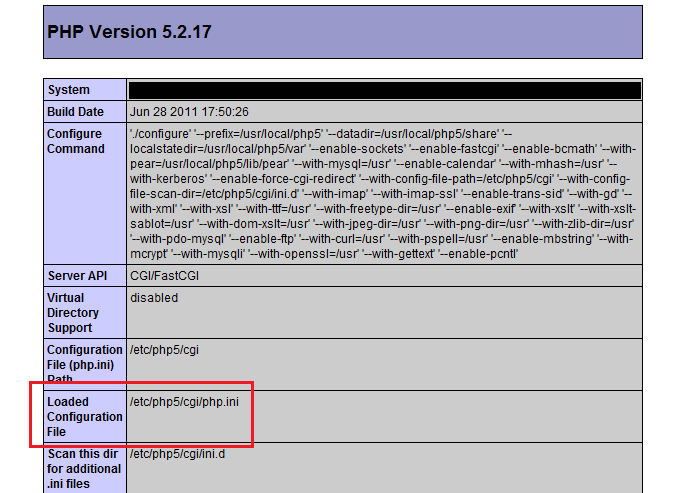
Use phpinfo() to find out
Write a simple PHP file with the following content:
<?php phpinfo();And upload it to your server and access it in your web browser to get a page like this:
Pingback: Change and Increase the Max PHP File Uploading Limit
Thanks.
I installed Nginx, and found the file with the commend “find / -name php.ini”
Pingback: How to bring down / optimize memory usage in your unmanaged Linux VPS box and avoid OOM (Out Of Memory) errors?
Thanks for this information. Now I’m modifying php.ini on my local server. Thanks again. Regards.
@John Ortiz I suggest you to restart the server after editing the ini file.
almost an hour i’m looking for that php.ini file. I know the path of that file, but where should i go?? i got hosting, not server, maybe this is not right?
i wanna ask them question . it.s no easily so why? tel information about that .remember i have to it
Will I need to send an email to my hosting service provided to see how the php.ini file is configured please?
Pingback: PHP: open_basedir in php.ini to Restrict and Limit PHP File Accesses to a Certain Directory
Can I add php.ini file in my website home directory.
thank you yang yang
Many thanks, ^_^
i used to try to find it manually, but fail, hehe
Thanks for this information. I’m using Share webhosting, i dont have access for PHP.ini file. may i know how can i replace this ?